

Parse Example
Overview
Loom has native functions that allow you to interface with Parse (http://www.parse.com) via some of its common REST interfaces. Loom also supports receiving Parse push notes sent through the Parse system. This example showcases two of the common REST functions, and Push Notes. Please be aware that Loom currently only supports push note functions on Android and iOS.
Try It
Use the following Loom CLI commands to run this example:
loom new MyParseExample --example ParseExample
cd MyParseExample
loom run
You will then need to set up a basic Parse application before running this example. Instructions for application setup can be found when signing up at http://www.parse.com.
Once your Parse app is set up, you will then need to do the following:
- Create a new user (or two!) in the Data Browser on the application's dashboard on the Parse site.
- Create an empty Installation object in the app's Data Browser (click on New Class, and select Installation as the object type). Add a column to the Installation object called “userId”.
- If you are deploying to iOS, set your Apple push certificate values in the Settings tab.
- Open up loom.config in the example's directory, and copy the required application keys from your Parse app into the relevant fields. You will require the Application ID, REST API key, and client key.
- You will also need to upload the Cloud Code for this example to your account. Detailed instructions for cloud code upload can be found at https://www.parse.com/docs/cloud_code_guide. The javascript source can be found in main.js under the Parse directory in your example (ParseCloudSrc/parse/cloud/main.js).
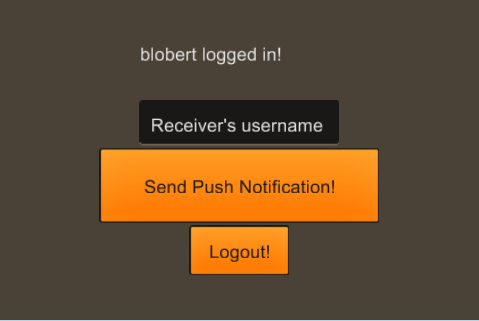
You can now run the example! Log in to a user account and try sending yourself a push notification. Better still, try logging in to separate accounts from two devices, and send notes to each other!
Screenshot
Code
src/ParseExample.ls
package
{
    import loom.Application;
    import loom2d.display.StageScaleMode;
    import loom2d.display.Image;
    import loom2d.textures.Texture;
    import loom2d.events.Event;
    import loom2d.events.Touch;
    import loom2d.events.TouchEvent;
    import loom2d.events.TouchPhase;

    import loom2d.text.TextField;
    import loom2d.text.BitmapFont;

    import feathers.themes.MetalWorksMobileTheme;
    import feathers.controls.TextInput;
    import feathers.controls.Button;
    import feathers.controls.Label;
    import feathers.events.FeathersEventType;

    import loom.social.Parse;


    /**
     *  Example Showcasing basic Parse REST functionality and Parse Push Note functionality
     */
    public class ParseExample extends Application
    {
        //Declare all of our controls

        var statusLabel:Label;
        var userLabel:Label;
        var username:String;
        var sessiontoken:String;
        var usernameInput:TextInput;
        var passwordInput:TextInput;
        var loginButton:Button;
        var logoutButton:Button;
        var pushnoteButton:Button;

        //Import the Feathers theme we'll use for our controls
        public var theme:MetalWorksMobileTheme;

        override public function run():void
        {
            // Comment out this line to turn off automatic scaling.
            stage.scaleMode = StageScaleMode.FILL;
            stage.stageWidth = 640;
            stage.stageHeight = 480;

            //Initialize Feathers source assets
            TextField.registerBitmapFont(BitmapFont.load("assets/arialComplete.fnt"), "SourceSansPro");
            TextField.registerBitmapFont(BitmapFont.load("assets/arialComplete.fnt"), "SourceSansProSemibold");
            theme = new MetalWorksMobileTheme();

            //Get REST credentials from loom.config file and pass to Parse
            var config = new JSON();
            config.loadString(Application.loomConfigJSON);
            Parse.REST_setCredentials(config.getString("parse_app_id"), config.getString("parse_rest_key"));

            //Set our onTimeout delegate. This will trigger after 10 seconds (by default) without a server response.
            Parse.REST_onTimeout = function()
            {
                statusLabel.text = "Timed out.";
            };

            userLabel = new Label();
            userLabel.text = "";
            userLabel.y=52;
            stage.addChild(userLabel);

            statusLabel = new Label();
            statusLabel.text = "Please log in";

            statusLabel.x = stage.stageWidth / 2-100;
            statusLabel.y = 50;

            stage.addChild(statusLabel);

            usernameInput = new TextInput();
            usernameInput.x = stage.stageWidth / 2-100;
            usernameInput.y = 150;
            usernameInput.prompt = "Username";
            usernameInput.maxChars = 100;
            usernameInput.isEditable = true;
            stage.addChild(usernameInput);

            passwordInput = new TextInput();
            passwordInput.x = stage.stageWidth / 2-100;
            passwordInput.y = 200;
            passwordInput.prompt = "Password";
            passwordInput.displayAsPassword = true;
            passwordInput.maxChars = 100;
            passwordInput.isEditable = true;
            stage.addChild(passwordInput);

            loginButton = new Button();
            loginButton.width = 100;
            loginButton.height = 50;
            loginButton.x = stage.stageWidth / 2;
            loginButton.y = 300;
            loginButton.label = "Login!";
            loginButton.center();
            loginButton.addEventListener(Event.TRIGGERED,loginUser);
            stage.addChild(loginButton);

            logoutButton = new Button();
            logoutButton.width = 100;
            logoutButton.height = 50;
            logoutButton.x = 50;
            logoutButton.y = 25;
            logoutButton.label = "Logout!";
            logoutButton.center();
            logoutButton.addEventListener(Event.TRIGGERED,logoutUser);
            logoutButton.visible = false;
            stage.addChild(logoutButton);

            pushnoteButton = new Button();
            pushnoteButton.width = 280;
            pushnoteButton.height = 75;
            pushnoteButton.x = stage.stageWidth / 2;
            pushnoteButton.y = 280;
            pushnoteButton.label = "Send Push Notification!";
            pushnoteButton.center();
            pushnoteButton.addEventListener(Event.TRIGGERED,sendPN);
            pushnoteButton.visible = false;
            stage.addChild(pushnoteButton);
        }


        //Call the Parse tick function to increment timeout and the request queue timer.
        //If this is not called, requests will not send or time out.
        override public function onTick():void
        {
            super.onTick();

            //tick Parse so that it can handle timeouts
            Parse.tick();
        }


        //Logs the user into a user account with the provided credentials
        public function loginUser(e:Event)
        {
            //Ensure we don't try sending empty strings.
            if(String.isNullOrEmpty(usernameInput.text) || String.isNullOrEmpty(passwordInput.text))
            {
                return;
            }

            //Update our status label
            statusLabel.text = "Logging in...";


            //Fire off the Parse REST function to log the user in
            Parse.REST_loginWithUsername(usernameInput.text,passwordInput.text,
            function(result:String) //request success delegate
            {
                trace(result);

                //Create a JSON object to parse the result the server returned
                var responseJSON:JSON = new JSON();
                responseJSON.loadString(result);

                username = responseJSON.getString("username");
                statusLabel.text = username+" logged in!";
                userLabel.text = "user: "+username;

                sessiontoken = responseJSON.getString("sessionToken");

                //Set the user's session token in the Parse object.
                Parse.REST_SessionToken = sessiontoken;

                //If Parse Push Notes are supported on this device, we pass the username to the Installation so we can target our push notes.
                if(Parse.isActive())
                {
                    Parse.updateInstallationUserID(username);
                }

                //Change our UI to send Push Notes
                usernameInput.text = "";
                usernameInput.prompt = "Receiver's username";
                passwordInput.text = "";
                passwordInput.visible=false;
                loginButton.visible=false;
                logoutButton.visible=true;
                pushnoteButton.visible=true;

            },
            function(result:String) //request failure delegate
            {
                trace(result);
                statusLabel.text = "Login failed!";

            });
        }

        //Resets our stored credentials and UI
        public function logoutUser()
        {
            username = "";
            sessiontoken = "";
            usernameInput.text = "";
            usernameInput.prompt = "Username";
            passwordInput.visible = true;
            loginButton.visible = true;
            logoutButton.visible = false;
            pushnoteButton.visible = false;

            statusLabel.text = "Logged out!";
            userLabel.text="";

        }


        //Calls a Parse Cloud Function that sends a push note to the specified user.
        public function sendPN()
        {
            if(String.isNullOrEmpty(usernameInput.text))
            {
                statusLabel.text = "Please enter a recipient username.";
                return;
            }
            statusLabel.text = "Sending Push Notification...";

            //Construct a JSON object to pass parameters to our cloud function

            var dataJSON = new JSON();
            dataJSON.loadString("{}");
            dataJSON.setString("recipientName",usernameInput.text);

            //Call the cloud function via Parse
            Parse.REST_callCloudFunction("sendPN",dataJSON,
            function(result:String) //Success!
            {
                usernameInput.text = "";
                statusLabel.text = "Push Notification Sent!";
            },
            function(result:String) //Failure!
            {
                statusLabel.text = "Error running cloud code";
            });
        }
    }
}