

Facebook and Teak Example
Overview
Loom has basic API support for Facebook session and permissions control, and optionally supports calls to the Teak API (http://www.teak.io) for Facebook social object creation and posting. Facebook and Teak support are only available for iOS and Android.
Try It
Use the following Loom CLI commands to run this example:
loom new MyFacebookTeakExample --example FacebookTeakExample
cd MyFacebookTeakExample
loom run
You will need to set up a test application on Facebook and Teak before this example will work correctly. Instructions for app setup on Facebook and Teak can be found at: - https://developers.facebook.com/docs/web/tutorials/scrumptious/register-facebook-application/ - http://www.teak.io (once signed up)
Once your test app is set up on Teak and Facebook, you will then need to do the following:
- Be sure that your Facebook app contains the proper Android Keyhash and/or iOS Bundle ID for the device you wish to deploy to, or Facebook will reject login attempts from your app.
- Create an achievement called “teakWorks” in your Teak app. Add whatever title, image and message you want.
- Place your Facebook Application Name (found on your Facebook app page) in the example's loom.config file under "facebook_display_name"
- Place your Facebook Application ID (found on your Facebook app page) in the example's loom.config file under "facebook_app_id"
- Place your Teak App Secret (found on the Teak app settings page) in the example's loom.config file under "teak_app_secret".
You can now run the example!
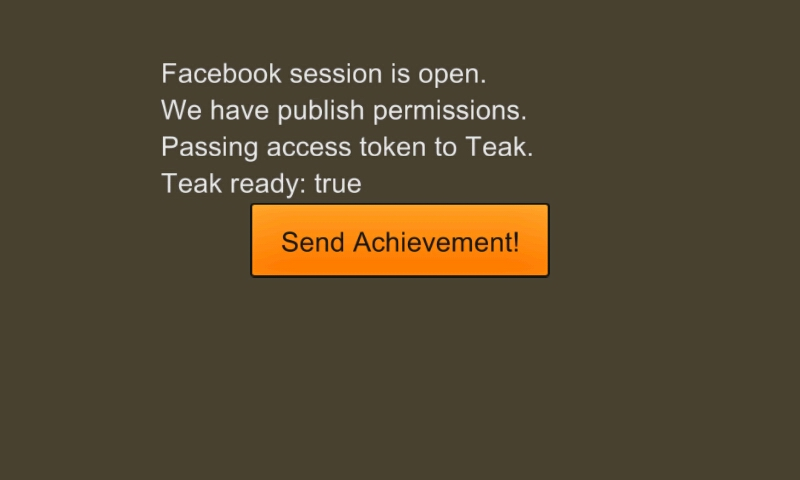
Screenshot
Code
src/FacebookTeakExample.ls
package
{
    import loom.Application;
    import loom2d.display.StageScaleMode;
    import loom2d.display.Image;
    import loom2d.textures.Texture;
    import loom2d.ui.SimpleLabel;

    import loom.social.Facebook;
    import loom.social.FacebookSessionState;
    import loom.social.FacebookErrorCode;
    import loom.social.Teak;
    import loom.HTTPRequest;

    import loom2d.events.Event;

    import feathers.themes.MetalWorksMobileTheme;
    import feathers.controls.TextInput;
    import feathers.controls.Button;
    import feathers.controls.Label;
    import feathers.events.FeathersEventType;

    import loom2d.text.TextField;
    import loom2d.text.BitmapFont;


    public class FBTeakExample extends Application
    {
        private var fbAccessToken:String;
        private var label:Label;
        private var fbLoginButton:Button;
        private var fbPublishButton:Button;
        private var teakPostButton:Button;
        private var logoutButton:Button;
        private var theme:MetalWorksMobileTheme;
        private var teakIsReady:Boolean = false;


        override public function run():void
        {
            // Comment out this line to turn off automatic scaling.
            stage.scaleMode = StageScaleMode.LETTERBOX;

            //Initialize Feathers source assets
            TextField.registerBitmapFont(BitmapFont.load("assets/arialComplete.fnt"), "SourceSansPro");
            TextField.registerBitmapFont(BitmapFont.load("assets/arialComplete.fnt"), "SourceSansProSemibold");
            theme = new MetalWorksMobileTheme();

            // Setup feedback label first
            label = new Label();
            label.text = "Hello Teak!";
            label.width = stage.stageWidth*2/3;
            label.height = 100;
            label.center();
            label.x = stage.stageWidth / 2;
            label.y = stage.stageHeight / 2 - 75;
            stage.addChild(label);

            //If the device doesn't support FB natively, display an error and ignore the rest of this function.
            if(!Facebook.isActive())
            {
                label.text = "Sorry, Facebook is not supported on this device.";
                label.center();
                Debug.print("{FACEBOOK} Sorry, Facebook is not initialised on this device. Facebook is only supported on Android and iOS.");
                return;
            }

            //Delegate a function to Facebook onSessionStatus to handle any changes in session.
            Facebook.onSessionStatus = sessionStatusChanged;

            //Delegate a handler to Teak for when its auth status changes.
            Teak.onAuthStatus = teakAuthStatusChanged;

            //Add our buttons
            fbLoginButton = new Button();
            fbLoginButton.label = "Log in to Facebook!";
            fbLoginButton.x = label.x = stage.stageWidth / 2;
            fbLoginButton.y = stage.stageHeight / 2+75;
            fbLoginButton.width = 200;
            fbLoginButton.height = 50;
            fbLoginButton.center();
            fbLoginButton.addEventListener(Event.TRIGGERED,
            function(e:Event)
            {
                //We open our session with email read permissions. This will automatically prompt the user to log in and provide permissions if necessary.
                Facebook.openSessionWithReadPermissions("email");
            });
            stage.addChild(fbLoginButton);

            fbPublishButton = new Button();
            fbPublishButton.label = "Get FB publish permissions!";
            fbPublishButton.x = stage.stageWidth / 2;
            fbPublishButton.y = stage.stageHeight / 2+75;
            fbPublishButton.width = 200;
            fbPublishButton.height = 50;
            fbPublishButton.center();
            fbPublishButton.visible = false;
            fbPublishButton.addEventListener(Event.TRIGGERED,
            function(e:Event)
            {
                //We request publish permissions from Facebook
                Facebook.requestNewPublishPermissions("publish_actions");
            });
            stage.addChild(fbPublishButton);

            teakPostButton = new Button();
            teakPostButton.label = "Post Achievement!";
            teakPostButton.x = stage.stageWidth / 2;
            teakPostButton.y = stage.stageHeight / 2 +75;
            teakPostButton.width = 200;
            teakPostButton.height = 50;
            teakPostButton.center();
            teakPostButton.visible = false;
            teakPostButton.addEventListener(Event.TRIGGERED,
            function(e:Event)
            {
                //We call teak to post the achievement defined server-side.
                Teak.postAchievement("teakWorks");
                label.text = "Posting achievement. Check your Facebook account.";
                teakPostButton.visible=false;
                logoutButton.visible=true;

            });
            stage.addChild(teakPostButton);

            logoutButton = new Button();
            logoutButton.label = "Log out!";
            logoutButton.x = stage.stageWidth / 2;
            logoutButton.y = stage.stageHeight / 2 +75;
            logoutButton.width = 200;
            logoutButton.height = 50;
            logoutButton.center();
            logoutButton.visible = false;
            logoutButton.addEventListener(Event.TRIGGERED,
            function(e:Event)
            {
                //Log out of our Facebook session and clear the token cache
                Facebook.closeAndClearTokenInformation();

                label.text = "Logging out.";
                logoutButton.visible=false;
                fbLoginButton.visible=true;


            });
            stage.addChild(logoutButton);

        }


        //This function will be called every time a change is made to the Facebook session - login, logout, change in permissions, etc.
        function sessionStatusChanged(sessionState:FacebookSessionState, sessionPermissions:String, errorCode:FacebookErrorCode):void
        {
            Debug.print("{FACEBOOK} sessionState changes to: " + sessionState.toString() + " with permissions: " + sessionPermissions);

            //We first check for any errors and prompt the user accordingly.
            if(errorCode != FacebookErrorCode.NoError)
            {
               switch(errorCode)
                {
                    case FacebookErrorCode.RetryLogin:
                        label.text = "Facebook login error. Please retry.";
                        break;
                    case FacebookErrorCode.UserCancelled:
                        //User cancelled the login process, so rest states and let them try again
                        label.text = "Facebook login cancelled by user.";
                        break;
                    case FacebookErrorCode.ApplicationNotPermitted:
                        //Application does not have permission to access Facebook, likely on iOS.
                        label.text = "Facebook application error. Please ensure your Facebook app has the correct settings.";
                        break;
                    case FacebookErrorCode.Unknown:
                        //Could be anything... display generic FB error dialog and let user try whatever they were doing again
                        label.text = "An unknown Facebook error occurred.";
                        break;
                }
                return;
            }

            //Check the new session state
            if (sessionState==FacebookSessionState.Opened)
            {
                //The session has changed with state Opened (generally after successful login, but also when requesting permissions)
                label.text = "Facebook session is open.\n";
                Debug.print("{FACEBOOK} sessionPermissions: " + sessionPermissions);

                fbAccessToken = Facebook.getAccessToken();
                fbLoginButton.visible = false;
                fbPublishButton.visible = true;

                Debug.print("{FACEBOOK} access token:       " + fbAccessToken);

                //Ensure that we got a valid access token
                if (String.isNullOrEmpty(fbAccessToken))
                {
                    label.text += "Error: Invalid FB Access Token.";
                    Debug.print("{FACEBOOK} Error: Invalid FB Access Token.");
                    return;
                }

                //Check whether we have publishing permissions on this session update
                if(!Facebook.isPermissionGranted("publish_actions"))
                {
                    label.text += "We do not have publish permissions.";
                    trace("{FACEBOOK} We do not have publish permissions.");
                }
                else
                {
                    label.text += "We have publish permissions.";
                    trace("{FACEBOOK} We have publish permissions.");

                    //If we do have publish permissions, we can disable the request button and will pass the FB token to Teak.
                    fbPublishButton.visible = false;
                    InitTeak();
                }
            }
            else if (sessionState==FacebookSessionState.Closed)
            {
                //Session has changed with state Closed
                label.text = "Facebook session has been closed.";
                Debug.print("{FACEBOOK} Session closed.");
            }

        }


        //Pass FB token to Teak if Teak is supported on this device.
        function InitTeak()
        {
            if(Teak.isActive())
            {
                //If Teak is already ready (for instance, if we have already passed it a token previously in this session), just activate the button.
                if(Teak.getStatus() == Teak.StatusReady)
                {
                    label.text+="\nTeak is already ready";
                    enablePostButton();
                }
                else //Otherwise, we pass the token and let the teakAuthStatusChanged function do the work
                {
                    label.text += "\nPassing access token to Teak.";
                    trace("{TEAK} Facebook access token passed to Teak.");

                    Teak.setAccessToken(fbAccessToken);
                }
            }
            else
            {
               label.text += "\nerror: Teak not initialized.";
               trace("{TEAK} Teak not initialized.");
            }
        }


        //This will be called whenever Teak's auth status changes
        function teakAuthStatusChanged()
        {
            trace("{TEAK} Auth Status has changed.");
            trace("{TEAK} Access status is now "+Teak.getStatus());

            //Check that Teak is ready for requests. We'll display the Post Achievement button in that case.
            if(Teak.getStatus() == Teak.StatusReady)
            {
                teakIsReady = true;
                enablePostButton();
            }
            else
            {
                teakIsReady = false;
            }

            trace("{TEAK} Ready: "+teakIsReady);
            label.text+="\nTeak ready: "+teakIsReady;
        }

        function enablePostButton()
        {
            teakPostButton.visible = true;
        }
    }
}