

ClipRectangleExample
Overview
How to use the clip rectangles to control the rendered area of screen
Try It
Use the following Loom CLI commands to run this example:
loom new MyClipRectExample --example ClipRectExample
cd MyClipRectExample
loom run
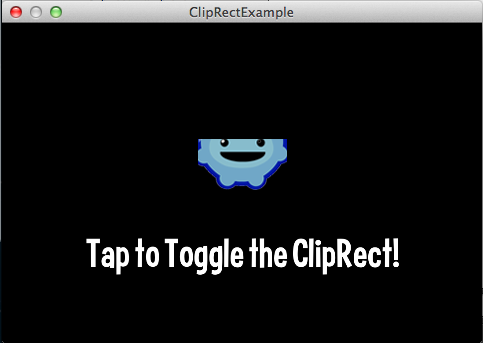
Screenshot
Code
src/ClipRectExample.ls
package
{
    import loom.Application;
    import loom2d.display.DisplayObjectContainer;
    import loom2d.display.Graphics;
    import loom2d.display.Image;
    import loom2d.display.Quad;
    import loom2d.display.Shape;
    import loom2d.display.Sprite;
    import loom2d.display.StageScaleMode;
    import loom2d.Loom2D;
    import loom2d.math.Point;
    import loom2d.math.Rectangle;
    import loom2d.textures.Texture;
    import loom2d.ui.SimpleLabel;

    /**
     *  Simple example to showcase the handling of clip rectangles
     */
    public class ClipRectExample extends Application
    {
        // The texture of the logo
        private var logoTexture:Texture;

        // The logo sprites
        private var logos = new Vector.<Sprite>();

        override public function run():void
        {
            stage.scaleMode = StageScaleMode.LETTERBOX;

            // Square size
            var w = 350;
            var h = 350;

            // Background label
            var label = new SimpleLabel("assets/fonts/Curse-hd.fnt", 320, 60);
            label.text = "clipRect clipping!";
            label.x = stage.stageWidth/2 - 320/2;
            label.y = stage.stageHeight - 140;
            stage.addChild(label);

            var a = getSquare(stage, 0xFFFFFF, 10, 10, w-20, h-20);

            // Corner squares
            var b1 = getSquare(a, 0xFBA82D, 20, 20, 20, 20);
            var b2 = getSquare(a, 0xFCC572, w-40, 20, 20, 20);
            var b3 = getSquare(a, 0xFDD79D, w-40, h-40, 20, 20);
            var b4 = getSquare(a, 0xFEE7C2, 20, h-40, 20, 20);

            // Strip background touching corner squares
            var c = getSquare(a, 0xE4E4E4, 40, 40, w-80, h-80);

            // Long strips cropped by strip bg
            var d1 = getSquare(c, 0xC4CBFF, w/2-10, -10, 20, h+20);
            var d2 = getSquare(c, 0xAEBAFF, -10, h/2-10, w+20, 20);

            // Short strips cropped by long strips
            // Y axis
            var e1 = getSquare(d1, 0xFDE895, -10, h/2-45, w+20, 10);
            var e2 = getSquare(d1, 0xFDE895, -10, h/2-25, w+20, 10);
            var e3 = getSquare(d1, 0xFDE895, -10, h/2+15, w+20, 10);
            var e4 = getSquare(d1, 0xFDE895, -10, h/2+35, w+20, 10);
            // X axis
            var f1 = getSquare(d2, 0xFDE895, w/2-45, -10, 10, h+20);
            var f2 = getSquare(d2, 0xFDE895, w/2-25, -10, 10, h+20);
            var f3 = getSquare(d2, 0xFDE895, w/2+15, -10, 10, h+20);
            var f4 = getSquare(d2, 0xFDE895, w/2+35, -10, 10, h+20);

            // Bigger inner corner squares relatively positioned
            var g1 = getSquare(c, 0x97DC8D, 0, 0, 60, 60); g1.x = 0+00+(40+10); g1.y = 0+00+(40+10);
            var g2 = getSquare(c, 0x97DC8D, 0, 0, 60, 60); g2.x = w-60-(40+10); g2.y = 0+00+(40+10);
            var g3 = getSquare(c, 0x97DC8D, 0, 0, 60, 60); g3.x = w-60-(40+10); g3.y = h-60-(40+10);
            var g4 = getSquare(c, 0x97DC8D, 0, 0, 60, 60); g4.x = 0+00+(40+10); g4.y = h-60-(40+10);

            // Inner corner scaled square with scaled borders
            var h1 = getSquare(g1, 0x7DC679, 1, 1, 4, 4); h1.scale = 10;
            var h2 = getSquare(g2, 0x7DC679, 1, 1, 4, 4); h2.scale = 10;
            var h3 = getSquare(g3, 0x7DC679, 1, 1, 4, 4); h3.scale = 10;
            var h4 = getSquare(g4, 0x7DC679, 1, 1, 4, 4); h4.scale = 10;

            // Red completely cropped out
            var rr = getSquare(stage, 0xFF0000, w/2, h/2, 0, 0);

            // Baked screenshot comparison for testing
            var comparison = new Image(Texture.fromAsset("assets/comparison.png"));
            comparison.x = w;
            stage.addChild(comparison);

            var shapeContainer = new Sprite();
            shapeContainer.y = h;
            shapeContainer.clipRect = new Rectangle(10, 10, 80, 40);
            stage.addChild(shapeContainer);

            var shapeQuad = new Quad(100, 100, 0xE8E8E8);
            shapeQuad.y = 10;
            shapeContainer.addChild(shapeQuad);

            var shape = new Shape();
            shapeContainer.addChild(shape);
            shape.y = 10;
            shape.clipRect = new Rectangle(5, 0, 90, 50);

            var g:Graphics = shape.graphics;

            g.beginFill(0x57CB0A);
            g.drawCircle(50, 50, 50);

            // Setup logos
            logoTexture = Texture.fromAsset("assets/logo.png");
            var n = 10;
            for (var i = 0; i < n; i++) {
                var logo = new Sprite();
                logo.x = 20+i/(n-1)*(stage.stageWidth-logoTexture.width-40);
                logo.y = 10+60+h;
                logo.addChild(new Image(logoTexture));
                stage.addChild(logo);
                logos.push(logo);
            }
        }

        /**
         * Get a Quad in a Sprite in the specified color and clipped with the specified coords
         * @param par   The parent of the Sprite.
         * @param color The color of the Quad.
         * @param x The x coord of the clipRect.
         * @param y The y coord of the clipRect.
         * @param w The width of the clipRect.
         * @param h The height of the clipRect.
         * @return  The clipped Sprite that contains the colored Quad.
         */
        private function getSquare(par:DisplayObjectContainer, color:int, x:Number, y:Number, w:Number, h:Number):Sprite {
            var s = new Sprite();
            var q = new Quad(10000, 10000, color);
            s.addChild(q);
            s.clipRect = new Rectangle(x, y, w, h);
            par.addChild(s);
            return s;
        }

        override public function onTick():void
        {
            // Animate clipRect for logos
            var t = Loom2D.juggler.elapsedTime;
            for (var i = 0; i < logos.length; i++) {
                var logo:Sprite = logos[i];
                var offset = (t+i/logos.length*5*(Math.sin(t*0.2-Math.PI/2)+1)*0.5)*Math.TWOPI;
                var size = (Math.sin(offset*0.5)+1)*0.5*logo.width;
                var p = new Point(Math.cos(offset*1.0)*size/2, Math.sin(offset*1.0)*size/2);

                // This is the important bit!
                logo.clipRect = new Rectangle(logo.width/2-size/2+p.x, logo.height/2-size/2+p.y, size, size);
            }

            // Animated Rectangle.clip() test
            // Requires g to be a Graphics instance of a displayed Shape

            /*
            g.clear();

            var a = new Rectangle(100, 100, 100, 100);
            var b = new Rectangle(120, 120, 50, 50);
            //var b = new Rectangle(120, 120, 200, 200);

            b.x = 125+80*Math.cos(Platform.getTime()/400);
            b.y = 125+80*Math.sin(Platform.getTime()/1400);

            g.beginFill(0xFF0000, 1);
            g.drawRect(a.x, a.y, a.width, a.height);

            g.beginFill(0x0000FF, 1);
            g.drawRect(b.x, b.y, b.width, b.height);

            a.clip(b.x, b.y, b.width, b.height);
            //b.clip(a.x, a.y, a.width, a.height);
            if (clipRectToggle) trace(a);

            g.beginFill(0xFF00FF, 1);
            if (a.width != 0 && a.height != 0) g.drawRect(a.x, a.y, a.width, a.height);
            //g.drawRect(b.x, b.y, b.width, b.height);
            //*/
        }


    }
}