

PureMVC Shop Example
Overview
Basic implementation of an in-game shop using the PureMVC framework
Try It
Use the following Loom CLI commands to run this example:
loom new MyPureMVCExample --example PureMVCExample
cd MyPureMVCExample
loom run
Screenshot
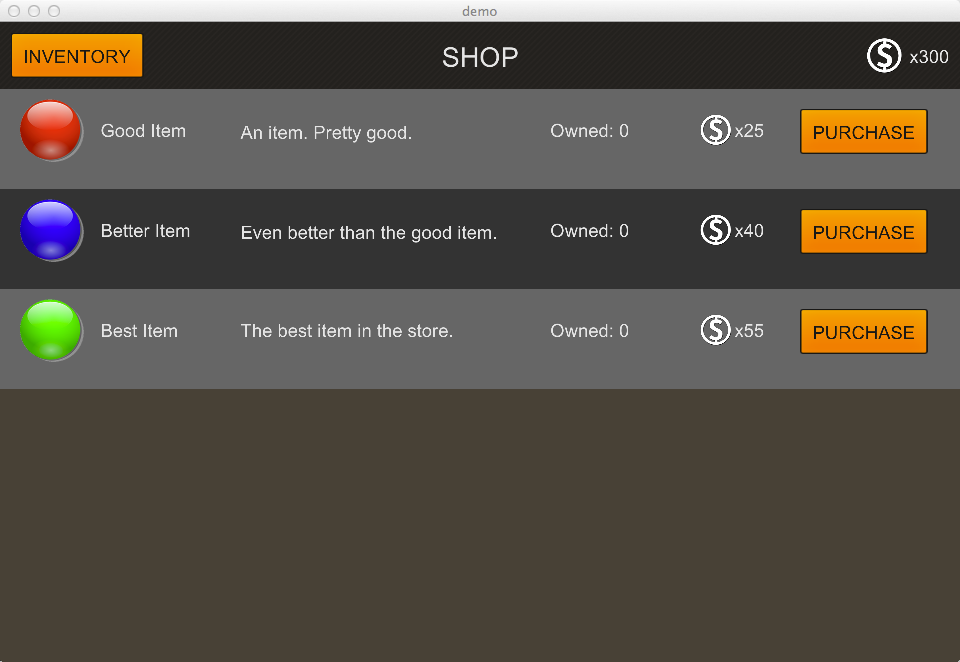
Code
src/Demo.ls
package
{
    import loom.Application;

    import loom2d.Loom2D;
    import loom2d.display.StageScaleMode;
    import loom2d.display.Quad;
    import loom2d.display.DisplayObject;
    import loom2d.display.Sprite;
    import loom2d.display.Image;
    import loom2d.textures.Texture;
    import loom2d.events.Event;
    import loom2d.text.BitmapFont;
    import loom2d.text.TextField;

    import feathers.core.FocusManager;
    import feathers.system.DeviceCapabilities;
    import feathers.themes.MetalWorksMobileTheme;
    import feathers.layout.VerticalLayout;
    import feathers.controls.PanelScreen;
    import feathers.controls.Button;
    import feathers.controls.Label;
    import feathers.events.FeathersEventType;
    import feathers.controls.ScreenNavigator;
    import feathers.controls.ScreenNavigatorItem;
    import feathers.motion.transitions.ScreenSlidingStackTransitionManager;

    import org.puremvc.loomsdk.interfaces.IFacade;
    import org.puremvc.loomsdk.interfaces.IMediator;
    import org.puremvc.loomsdk.interfaces.INotification;
    import org.puremvc.loomsdk.patterns.facade.Facade;
    import org.puremvc.loomsdk.patterns.command.SimpleCommand;
    import org.puremvc.loomsdk.patterns.mediator.Mediator;
    import org.puremvc.loomsdk.patterns.proxy.Proxy;

    /**
     * An example of an in-game shop. Demonstrates a use of the PureMVC framework
     * to control views and modify data.
     */

    public class Demo extends Application
    {
        public static var theme:MetalWorksMobileTheme;

        override public function run():void
        {
            // Initialize the stage.
            stage.scaleMode = StageScaleMode.LETTERBOX;
            stage.stageWidth = 960;
            stage.stageHeight = 640;

            // Initialize PureMVC
            var facade = Facade.getInstance();
            facade.registerCommand( StartupCommand.NAME, StartupCommand );
            facade.sendNotification( StartupCommand.NAME );
        }
    }


    /** ***********************************************************
    //  CONTROLLER
    // ************************************************************


    /**
     * PureMVC uses commands to perform logic between the views and the data model.
     * We use our StartUpCommand to register the commands we intend to use in the
     * application, initialize the data model, and finally create our core views.
     */

    public class StartupCommand extends SimpleCommand
    {
        public static const NAME:String = "StartupCommand";

        override public function execute( notification:INotification ):void
        {
            // Unregister this command on execution since we only need to run this once
            facade.removeCommand( StartupCommand.NAME );

            registerCommands();
            initializeModel();
            initializeView();
        }

        private function registerCommands():void
        {
            trace( "Registering Commands" );
            facade.registerCommand( ShowDialogCommand.NAME, ShowDialogCommand );
            facade.registerCommand( RequestPurchaseCommand.NAME, RequestPurchaseCommand );
            facade.registerCommand( ConfirmPurchaseCommand.NAME, ConfirmPurchaseCommand );
            facade.registerCommand( ShowNotificationCommand.NAME, ShowNotificationCommand );
        }

        private function initializeModel():void
        {
            trace( "Initializing Data Model" );
            facade.registerProxy( new ItemProxy() );
        }

        private function initializeView():void
        {
            trace( "Initializing Core Views" );

            // We do some Feathers boilerplate initialization here...
            DeviceCapabilities.dpi = Platform.getDPI();
            TextField.registerBitmapFont( BitmapFont.load( "assets/arialComplete.fnt" ), "SourceSansPro" );
            TextField.registerBitmapFont( BitmapFont.load( "assets/arialComplete.fnt" ), "SourceSansProSemibold" );
            Demo.theme = new MetalWorksMobileTheme();
            FocusManager.pushFocusManager();

            // Then create our main views
            facade.registerMediator( new MasterViewMediator() );
            facade.registerMediator( new InventoryScreenMediator() );
            facade.registerMediator( new ShopScreenMediator() );
            facade.registerMediator( new PurchaseConfirmationScreenMediator() );
            facade.registerMediator( new NotificationScreenMediator() );

            sendNotification( ShowDialogCommand.NAME, ShopScreenMediator.NAME );
        }
    }

    /**
     * The ShowDialogCommand shows the screen passed in by name through the body of the notification
     * by accessing our MasterViewMediator and forwarding the dialog name to its showDialog() method.
     */

    public class ShowDialogCommand extends SimpleCommand
    {
        public static const NAME:String = "ShowDialogCommand";

        override public function execute( notification:INotification ):void
        {
            var masterViewMediator = facade.retrieveMediator( MasterViewMediator.NAME ) as MasterViewMediator;
            masterViewMediator.showDialog( notification.getBody() as String );
        }
    }

    /**
     * Opens up the purchase confirmation page, setting the displayed item by the id passed in
     * the notification body.
     */

    public class RequestPurchaseCommand extends SimpleCommand
    {
        public static const NAME:String = "RequestPurchaseCommand";

        override public function execute( notification:INotification ):void
        {
            var itemProxy = facade.retrieveProxy( ItemProxy.NAME ) as ItemProxy;
            var item = itemProxy.getItemDataById( notification.getBody() as String );

            if ( itemProxy.playerCoins < item.cost )
            {
                // If we don't have have enough coins to purchase the item, show a notification
                sendNotification( ShowNotificationCommand.NAME, "You do not have enough coins." );
            }
            else
            {
                // Otherwise configure our purchase confirmation screen to show the item, then open the dialog
                var purchasePage = facade.retrieveMediator( PurchaseConfirmationScreenMediator.NAME ) as PurchaseConfirmationScreenMediator;
                purchasePage.configure( notification.getBody() as String );
                sendNotification( ShowDialogCommand.NAME, PurchaseConfirmationScreenMediator.NAME );
            }
        }
    }

    /**
     * This command tells the ItemProxy to purchase the item passed in by id via notification body,
     * then opens up the notification screen with a message confirming the purchase was successful.
     */

    public class ConfirmPurchaseCommand extends SimpleCommand
    {
        public static const NAME:String = "ConfirmPurchaseCommand";

        override public function execute( notification:INotification ):void
        {
            ItemProxy( facade.retrieveProxy( ItemProxy.NAME ) ).purchaseItem( notification.getBody() as String );
            sendNotification( ShowNotificationCommand.NAME, "Purchase successful!" );
        }
    }

    /**
     * This command opens up the notification dialog, setting the text to the passed in notification body.
     */

    public class ShowNotificationCommand extends SimpleCommand
    {
        public static const NAME:String = "ShowNotificationCommand";

        override public function execute( notification:INotification ):void
        {
            NotificationScreenMediator( facade.retrieveMediator( NotificationScreenMediator.NAME ) ).notificationMessage = notification.getBody() as String;
            sendNotification( ShowDialogCommand.NAME, NotificationScreenMediator.NAME );
        }
    }


    // ************************************************************
    //  MODEL
    // ************************************************************


    /**
     * PureMVC uses what is referred to as a Proxy to store and manage the data model. The
     * ItemProxy handles item manifest data, player coins, player inventory, and purchases.
     */

    public class ItemProxy extends Proxy
    {
        public static const NAME:String = "ItemProxy";

        public static const INVENTORY_UPDATED:String = "InventoryUpdated";

        // We'll initialize our item data here for this example. You could also read in
        // data like this from a JSON file or web request

        private static const ITEM_DATA:Dictionary.<String, ItemVO> = {
            "goodItem" : new ItemVO( "goodItem", "Good Item", "An item. Pretty good.", 25, "assets/ball-red.png" ),
            "betterItem" : new ItemVO( "betterItem", "Better Item", "Even better than the good item.", 40, "assets/ball-blue.png" ),
            "bestItem" : new ItemVO( "bestItem", "Best Item", "The best item in the store.", 55, "assets/ball-green.png" )
        };

        private var _playerInventory:Dictionary.<String, int> = {};
        private var _playerCoins:int = 300;

        public function ItemProxy()
        {
            super( NAME );
        }

        public function get itemList():Dictionary.<String, ItemVO> { return ITEM_DATA; }

        public function get playerCoins():int { return _playerCoins; }

        public function getItemDataById( id:String ):ItemVO
        {
            return ITEM_DATA[ id ];
        }

        public function getQuantityOwned( id:String ):int
        {
            return _playerInventory[ id ] ? _playerInventory[ id ] : 0;
        }

        public function purchaseItem( id:String ):void
        {
            var item = getItemDataById( id );
            _playerCoins -= item.cost;
            if ( _playerInventory[ id ] == null ) _playerInventory[ id ] = 1;
            else _playerInventory[ id ]++;

            // Let the rest of the views know that something has changed
            sendNotification( INVENTORY_UPDATED );
        }
    }

    /**
     * PureMVC Proxies hold data in simple objects called Value Objects, or VOs. The ItemVO here
     * stores all the data needed for a single item.
     */

    public class ItemVO
    {
        public var id:String;
        public var name:String;
        public var description:String;
        public var cost:int;
        public var imagePath:String;

        public function ItemVO( id:String, name:String, description:String, cost:int, imagePath:String )
        {
            this.id = id;
            this.name = name;
            this.description = description;
            this.cost = cost;
            this.imagePath = imagePath;
        }
    }


    // ************************************************************
    //  VIEW
    // ************************************************************


    /**
     * PureMVC uses what is referred to as a Mediator to connect view components to the rest of the application.
     * This MasterViewMediator will be used as our root view provider, showing and hiding the view components
     * from the other individual screens.
     */

    public class MasterViewMediator extends Mediator
    {
        public static const NAME:String = "MasterViewMediator";
        public static const DIALOG_CHANGED:String = "DialogChanged";

        private var _currentDialog:IMediator;
        private var _navigator:ScreenNavigator;
        private var _transitionManager:ScreenSlidingStackTransitionManager;

        public function MasterViewMediator()
        {
            super( NAME, Loom2D.stage );
        }

        override public function onRegister():void
        {
            _navigator = new ScreenNavigator();
            _navigator.autoDisposeScreens = false; // Retaining screens so we don't need to recreate them every time they are shown
            Loom2D.stage.addChild( _navigator );
            _transitionManager = new ScreenSlidingStackTransitionManager( _navigator );
        }

        public function showDialog( mediatorName:String ):void
        {
            var mediator:IMediator = facade.retrieveMediator( mediatorName );

            if ( !_navigator.hasScreen( mediatorName ) )
                _navigator.addScreen( mediatorName, new ScreenNavigatorItem( mediator.getViewComponent() as DisplayObject ) );

            _currentDialog = mediator;
            _navigator.showScreen( mediatorName );
        }
    }

    /**
     * A base view Mediator class that contains all the functionality shared by the rest of the application views.
     * Do not instantiate directly, but subclass this to create views.
     */

    public class BaseScreenMediator extends Mediator
    {
        protected var _view:PanelScreen;
        protected var _layout:VerticalLayout;
        protected var _coinLabel:Label;

        public function BaseScreenMediator( name:String ):void
        {
            super( name );
        }

        override public function onRegister():void
        {
            super.onRegister();
            _view = new PanelScreen();
            setViewComponent( _view );
            preInitializeView();
            initializeView();
        }

        override public function listNotificationInterests():Vector.<String>
        {
            return [ ItemProxy.INVENTORY_UPDATED ];
        }

        override public function handleNotification( notification:INotification ):void
        {
            switch( notification.getName() )
            {
                case ItemProxy.INVENTORY_UPDATED:
                    _coinLabel.text = "x" + getItemProxy().playerCoins;
                    break;
            }
        }

        protected function getItemProxy():ItemProxy
        {
            return facade.retrieveProxy( ItemProxy.NAME ) as ItemProxy;
        }

        protected function preInitializeView():void
        {
            _layout = new VerticalLayout();
            _layout.horizontalAlign = VerticalLayout.HORIZONTAL_ALIGN_CENTER;
            _view.layout = _layout;

            _coinLabel = new Label();
            _coinLabel.text = "x" + getItemProxy().playerCoins;

            var coinImage = new Image( Texture.fromAsset( "assets/coin.png" ) );
            coinImage.width = coinImage.height = 48 * Demo.theme.scale;

            _view.headerProperties[ "rightItems" ] = [ coinImage, _coinLabel ];
        }

        protected function initializeView():void
        {
            // Override in subclasses to set up views
        }
    }

    /**
     * Our inventory screen. Displays rows of item data and quantities.
     */

    public class InventoryScreenMediator extends BaseScreenMediator
    {
        public static const NAME:String = "InventoryScreenMediator";

        protected var _shopMode:Boolean = false;
        protected var _itemRows:Vector.<ItemRowView> = [];

        // To allow subclassing, allow an alternate mediator name to be passed in

        public function InventoryScreenMediator( name:String = NAME )
        {
            super( name );
        }

        override public function handleNotification( notification:INotification ):void
        {
            super.handleNotification( notification );

            // If we receieve a notification that the inventory data has changed,
            // we update our rows to reflect the change

            if ( notification.getName() == ItemProxy.INVENTORY_UPDATED ) updateItems();
        }

        override protected function initializeView():void
        {
            _view.headerProperties[ "title" ] = "INVENTORY";

            var shopButton = new Button();
            shopButton.label = "SHOP";
            shopButton.addEventListener( Event.TRIGGERED, onShopButtonHit );

            _view.headerProperties[ "leftItems" ] = [ shopButton ];
        }

        protected function updateItems():void
        {
            _view.removeChildren( 0, _view.numChildren, false );

            var proxy = getItemProxy();
            var itemList = proxy.itemList;
            var i = 0;

            for each ( var item in itemList )
            {
                // If not in shop mode, only show inventory rows for owned items
                var totalOwned = proxy.getQuantityOwned( item.id );
                if ( !_shopMode && totalOwned == 0 ) continue;

                // Create new rows as needed and cache them
                if ( _itemRows.length <= i ) _itemRows.push( new ItemRowView() );
                var itemRow = _itemRows[ i ];

                // Alternate background colors every other row
                var rowColor = ( i & 1 ) ? 0x333333 : 0x666666;

                itemRow.configure( item, totalOwned, _shopMode, rowColor );
                _view.addChild( itemRow );
                i++;
            }
        }

        private function onShopButtonHit( e:Event ):void
        {
            sendNotification( ShowDialogCommand.NAME, ShopScreenMediator.NAME );
        }
    }

    /**
     * Our shop screen. Almost identical to our inventory screen, except shows ALL item types with the option to purchase.
     */

    public class ShopScreenMediator extends InventoryScreenMediator
    {
        public static const NAME:String = "ShopScreenMediator";

        public function ShopScreenMediator()
        {
            super( NAME );
            _shopMode = true;
        }

        override protected function initializeView():void
        {
            _view.headerProperties[ "title" ] = "SHOP";

            var inventoryButton = new Button();
            inventoryButton.label = "INVENTORY";
            inventoryButton.addEventListener( Event.TRIGGERED, onInventoryButtonHit );

            _view.headerProperties[ "leftItems" ] = [ inventoryButton ];

            updateItems();
        }

        private function onInventoryButtonHit( e:Event ):void
        {
            sendNotification( ShowDialogCommand.NAME, InventoryScreenMediator.NAME );
        }
    }

    /**
     * A basic notification screen that shows a line of text and an OK button that brings you back to the shop.
     */

    public class NotificationScreenMediator extends BaseScreenMediator
    {
        public static const NAME:String = "NotificationScreenMediator";

        private var _notificationLabel:Label;
        private var _okButton:Button;

        public function NotificationScreenMediator()
        {
            super( NAME );
        }

        public function set notificationMessage( value:String ):void
        {
            _notificationLabel.text = value;
        }

        public function get notificationMessage():String
        {
            return _notificationLabel.text;
        }

        override protected function initializeView():void
        {
            _view.headerProperties[ "title" ] = "";
            _layout.padding = 100;
            _layout.gap = 50;
            _notificationLabel = _view.addChild( new Label() ) as Label;
            _okButton = _view.addChild( new Button() ) as Button;
            _okButton.label = "OK";
            _okButton.addEventListener( Event.TRIGGERED, onOKButtonHit );
        }

        private function onOKButtonHit( e:Event ):void
        {
            sendNotification( ShowDialogCommand.NAME, ShopScreenMediator.NAME );
        }
    }

    /**
     * A purchase confirmation screen. Makes sure you really want to buy an item.
     */

    public class PurchaseConfirmationScreenMediator extends BaseScreenMediator
    {
        public static const NAME:String = "PurchaseConfirmationScreenMediator";

        private var _confirmLabel:Label;
        private var _icon:Image;
        private var _confirmButton:Button;
        private var _cancelButton:Button;
        private var _itemId:String;

        public function PurchaseConfirmationScreenMediator()
        {
            super( NAME );
        }

        public function configure( itemId:String ):void
        {
            var item = ItemProxy( facade.retrieveProxy( ItemProxy.NAME ) ).getItemDataById( itemId );
            _confirmLabel.text = "Purchase a " + item.name + " for " + item.cost + " coins?";
            _icon.texture = Texture.fromAsset( item.imagePath );
            _icon.width = _icon.height = 128;
            _view.invalidate();
            _itemId = itemId;
        }

        override protected function initializeView():void
        {
            _layout.gap = 20;
            _layout.padding = 30;
            _view.headerProperties[ "title" ] = "CONFIRM PURCHASE";
            _confirmLabel = _view.addChild( new Label() ) as Label;
            _icon = _view.addChild( new Image() ) as Image;
            _confirmButton = _view.addChild( new Button() ) as Button;
            _confirmButton.label = "CONFIRM";
            _confirmButton.addEventListener( Event.TRIGGERED, onConfirm );
            _cancelButton = _view.addChild( new Button() ) as Button;
            _cancelButton.label = "CANCEL";
            _cancelButton.addEventListener( Event.TRIGGERED, onCancel );
        }

        private function onConfirm( e:Event ):void
        {
            sendNotification( ConfirmPurchaseCommand.NAME, _itemId );
        }

        private function onCancel( e:Event ):void
        {
            sendNotification( ShowDialogCommand.NAME, ShopScreenMediator.NAME );
        }
    }

    /**
     * A simple view component that shows item data and an optional purchase button
     */

    public class ItemRowView extends Sprite
    {
        private var _bgQuad:Quad;
        private var _icon:Image;
        private var _nameLabel:Label;
        private var _descriptionLabel:Label;
        private var _ownedLabel:Label;
        private var _costIcon:Image;
        private var _costLabel:Label;
        private var _purchaseButton:Button;
        private var _currentItem:ItemVO;

        public function ItemRowView()
        {
            _bgQuad = addChild( new Quad( Loom2D.stage.stageWidth, 100 ) ) as Quad;

            _icon = addChild( new Image() ) as Image;
            _icon.x = 20;
            _icon.y = 10;
            _nameLabel = addChild( new Label() ) as Label;
            _nameLabel.x = 100;
            _nameLabel.y = 30;
            _descriptionLabel = addChild( new Label() ) as Label;
            _descriptionLabel.x = 240;
            _descriptionLabel.y = 30;
            _ownedLabel = addChild( new Label() ) as Label;
            _ownedLabel.x = 550;
            _ownedLabel.y = 30;
            _costIcon = addChild( new Image( Texture.fromAsset( "assets/coin.png" ) ) ) as Image;
            _costIcon.width = _costIcon.height = 32;
            _costIcon.x = 700;
            _costIcon.y = 25;
            _costLabel = addChild( new Label() ) as Label;
            _costLabel.x = 734;
            _costLabel.y = 30;
            _purchaseButton = addChild( new Button() ) as Button;
            _purchaseButton.label = "PURCHASE";
            _purchaseButton.addEventListener( Event.TRIGGERED, onPurchase );
            _purchaseButton.x = 800;
            _purchaseButton.y = 20;
        }

        public function configure( item:ItemVO, quantityOwned:int, showPurchaseButton:Boolean, rowColor:uint ):void
        {
            _icon.texture = Texture.fromAsset( item.imagePath );
            _icon.width = _icon.height = 64;
            _nameLabel.text = item.name;
            _descriptionLabel.text = item.description;
            _ownedLabel.text = "Owned: " + quantityOwned;
            _costLabel.text = "x" + item.cost;
            _bgQuad.color = rowColor;
            _currentItem = item;

            _costIcon.visible = _costLabel.visible = _purchaseButton.visible = showPurchaseButton;
        }

        private function onPurchase( e:Event ):void
        {
            // Since this isn't a Mediator, we need to access the facade via its Singleton
            // to send a notification
            Facade.getInstance().sendNotification( RequestPurchaseCommand.NAME, _currentItem.id );
        }
    }
}