

Pong
Overview
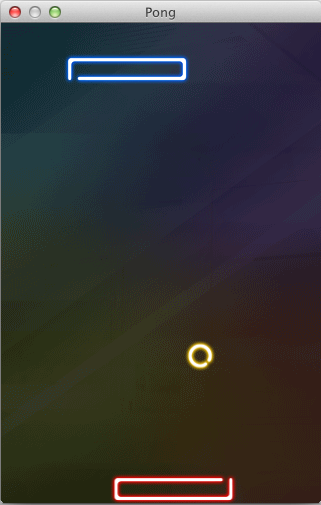
Basic implemenation of Pong with Background Music
Try It
Use the following Loom CLI commands to run this example:
loom new MyPong --example Pong
cd MyPong
loom run
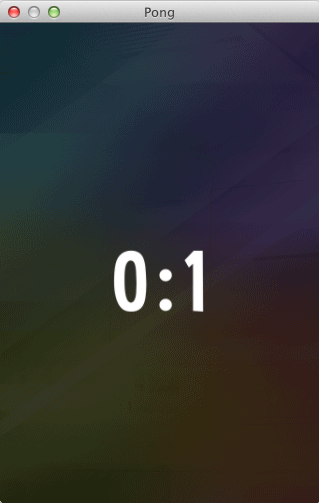
Screenshot
Code
src/Pong.ls
package
{
import loom.sound.SimpleAudioEngine;
import loom.Application;
import loom2d.Loom2D;
import loom2d.display.Image;
import loom2d.display.Stage;
import loom2d.display.StageScaleMode;
import loom2d.textures.Texture;
import loom2d.math.Point;
import loom2d.animation.Transitions;
import loom2d.ui.SimpleLabel;
import loom2d.ui.TextureAtlasManager;
import loom2d.events.Touch;
import loom2d.events.TouchEvent;
import loom2d.events.TouchPhase;
import loom.Application;
import loom.gameframework.LoomGameObject;
import loom.gameframework.LoomGroup;
import system.platform.Platform;
import system.platform.Gamepad;
/**
* This is a Loom example game written entirely in LoomScript.
* It aims to showcase the various features of the language and the engine through implementing a classic Pong clone.
* The game starts off in portrait mode with a top (AI) and a bottom (PLAYER) paddle and a single ball.
* By tapping or clicking right or left of your paddle, you can direct it to return the ball to your opponent.
*/
public class Pong extends Application
{
public var config_WIN_SCORE:Number = 5; ///< The number of points either player must reach first in order to win.
public var config_PLAY_SCALE:Number = 1; ///< This setting defines a base scale for all game objects.
public var config_SPEED:Number = 100; ///< Global speed.
public var config_REFLEX:Number = 10; ///< Ai reflex (maximum response time to a ball movement change in frames).
var config_TOP_AI:Boolean = true; ///< Human / ai settings for the top paddle.
var config_BOTTOM_AI:Boolean = true; ///< Human / ai setting for the bottom paddle.
public var ballObjs:Vector.<LoomGameObject> = []; ///< Ball game objects.
public var paddleObjs:Vector.<LoomGameObject> = []; ///< Paddle game objects.
var lastFrame:Number = 0; ///< The platform time in milliseconds of the previous frame.
var playing:Boolean = false; ///< A flag to show if the game is in active play mode.
public var lastTouchX:Number = 0; ///< Caching the previous touch position and an active touch state.
public var lastTouchY:Number = 0;
public var touching:Boolean = false;
var scores:Vector.<Number> = [0,0]; ///< Player scores.
var score:SimpleLabel; ///< A Label that is meant to display score information
///< and who the winner is once the game is over.
var scale = 1; ///< The overall scale of the screen compared to the designed stage
public var assetScale:Number = 1; ///< The scale applied to all assets
/**
* Grants access to the PongBallMover object under the given index.
*
* @param _id:int The index of the PongBallMover object to return.
* @return PongBallMover The PongBallMover object at the given index.
*/
public function getBallMover(_id:int):PongBallMover
{
if (_id < 0 || _id >= ballObjs.length)
return null;
return ballObjs[_id].lookupComponentByName("mover") as PongBallMover;
}
/**
* Grants access to the PongPaddleMover object under the given index.
*
* @param _id:int The index of the PonPaddleMover object to return.
* @return PongBallMover The PongPaddleMover object at the given index.
*/
public function getPaddleMover(_id:int):PongPaddleMover
{
if (_id < 0 || _id >= paddleObjs.length)
return null;
return paddleObjs[_id].lookupComponentByName("mover") as PongPaddleMover;
}
/**
* A check to see whether the game is playing. It is either playing or it is suspended by ie. showing the score.
*
* @return Boolean Returns true if the game is currently playing.
*/
public function isPlaying():Boolean
{
return playing;
}
/**
* Pauses / unpauses the game.
*
* @param _playing:Boolean True if the game must play, false if it needs to be suspended.
*/
public function setPlaying(_playing:Boolean)
{
// start / stop all game objects
playing = _playing;
for (var b=0;b<ballObjs.length;b++)
getBallMover(b).playing = _playing;
for (var p=0;p<paddleObjs.length;p++)
getPaddleMover(p).playing = _playing;
}
/**
* Tick function called at every frame. This is responsible for moving all the balls of the screen and handling paddles.
* If a goal is scored, this is where the game will be suspended to give either player a point and display the actual score.
*/
public function onFrame():void
{
Gamepad.update();
// another way to get a delta (dt) in milliseconds
var thisFrame:Number = Platform.getTime();
var dt:Number = thisFrame - lastFrame;
if (dt <= 0)
return;
lastFrame = thisFrame;
// if the frame rate is too low, stop the game until it becomes playable
// this could be caused by dragging the window around
// if it can't be painted, it shouldn't play
var lowFps = false;
if (dt > 1000 / 10)
lowFps = true;
if (!isPlaying() || lowFps)
return;
// move the ball and handle walls
for (var b=0;b<ballObjs.length;b++)
getBallMover(b).move(dt, this);
// check for paddle collision and goals
var scorer:Number = -1;
for (var p=0;p<paddleObjs.length;p++)
{
if (getPaddleMover(p).checkHit(dt, this))
{
scorer = p;
break;
}
}
// if either player scored, present it
if (scorer > -1)
{
// pause the game
setPlaying(false);
// hide all balls
hideAllBalls(function(){
// then hide all paddles
hideAllPaddles(function(){
// then increase the score of the scoring paddle
scores[scorer]++;
// and show the score (hack - for paddles 0 and 1)
showScore(scores[0] + " : " + scores[1], function(){
// if either player won, call endgame
for (var s=0;s<scores.length;s++)
{
if (scores[s] >= config_WIN_SCORE)
{
endgame("Player "+(s+1)+" wins.");
return;
}
}
// a new set begins - reset ball speed and show all objects
resetGame();
});
});
});
}
}
/**
* This method removes all but a single ball, returns the ball and the paddles to their origin positions and unpauses the game.
*/
public function resetGame()
{
// remove old sprites from the screen
for (var b=0;b<ballObjs.length;b++)
ballObjs[b].destroy();
// clear all and spawn one
ballObjs.clear();
ballObjs.pushSingle(spawnBall(config_SPEED));
// Reset paddles
for (var p=0;p<paddleObjs.length;p++) {
var mover = getPaddleMover(p);
mover.x = stage.stageWidth / 2;
mover.y = stage.stageHeight / 2;
//mover.scale = 0;
}
// hack - we have two paddles.. for now >:)
var p0PaddleMover = getPaddleMover(0);
var p1PaddleMover = getPaddleMover(1);
p0PaddleMover.x = stage.stageWidth / 2 - (p0PaddleMover.WIDTH * assetScale) / 2;
p0PaddleMover.y = p0PaddleMover.HEIGHT * assetScale * 1.5;
p1PaddleMover.x = stage.stageWidth / 2;
p1PaddleMover.y = stage.stageHeight - (p1PaddleMover.HEIGHT * assetScale * 2.5);
p1PaddleMover.goalBelow = false;
// show all paddles
showAllPaddles(function(){
// then show all balls
showAllBalls(function(){
// switch movement and control back on
setPlaying(true);
});
});
}
/**
* Hides all balls at the same time.
*
* @param _callback:Function The function to be called once all balls had been hidden.
*/
function hideAllBalls(_callback:Function)
{
if (ballObjs.length == 0)
return;
for (var b=0;b<ballObjs.length-1;b++)
{
Loom2D.juggler.tween(getBallMover(b), 0.3, {"alpha": 0, "transition": Transitions.EASE_OUT_BOUNCE});
}
// the last one triggers the callback
Loom2D.juggler.tween(getBallMover(ballObjs.length-1), 0.3, {"alpha": 0, "transition": Transitions.EASE_OUT_BOUNCE, "onComplete": _callback});
}
/**
* Hides all paddles at the same time.
*
* @param _callback:Function The function to be called once all paddles had been hidden.
*/
function hideAllPaddles(_callback:Function)
{
if (paddleObjs.length == 0)
return;
for (var p=0;p<paddleObjs.length-1;p++)
{
Loom2D.juggler.tween(getPaddleMover(p), 0.3, {"alpha": 0, "transition": Transitions.EASE_OUT_BOUNCE});
}
// the last one triggers the callback
Loom2D.juggler.tween(getPaddleMover(paddleObjs.length-1), 0.3, {"alpha": 0, "transition": Transitions.EASE_OUT_BOUNCE, "onComplete": _callback});
}
/**
* Shows all balls at the same time.
*
* @param _callback:Function The function to be called once all balls had been shown.
*/
function showAllBalls(_callback:Function)
{
if (ballObjs.length == 0)
return;
for (var b=0;b<ballObjs.length-1;b++)
{
Loom2D.juggler.tween(getPaddleMover(b), 0.3, {"alpha": 1, "transition": Transitions.EASE_OUT_BOUNCE});
}
// the last one triggers the callback
Loom2D.juggler.tween(getBallMover(ballObjs.length-1), 0.3, {"alpha": 1, "transition": Transitions.EASE_OUT_BOUNCE, "onComplete": _callback});
}
/**
* Shows all paddles at the same time.
*
* @param _callback:Function The function to be called once all paddles had been shown.
*/
function showAllPaddles(_callback:Function)
{
if (paddleObjs.length == 0)
return;
for (var p=0;p<paddleObjs.length-1;p++)
{
Loom2D.juggler.tween(getPaddleMover(p), 0.3, {"alpha": 1, "transition": Transitions.EASE_OUT_BOUNCE});
}
// the last one triggers the callback
Loom2D.juggler.tween(getPaddleMover(paddleObjs.length-1), 0.3, {"alpha": 1, "transition": Transitions.EASE_OUT_BOUNCE, "onComplete": _callback});
}
/**
* Shows then hides a message for score on the screen and returns by calling a callback function.
*
* @param _msg:String The message to show for score.
* @param _callback:Function The function to be called once the score message had been shown and then hidden.
*/
function showScore(_msg:String, _callback:Function)
{
score.text = _msg;
score.x = stage.stageWidth/2 - (score.width/2);
score.y = stage.stageHeight/2 - (score.height);
// and show the score
Loom2D.juggler.tween(score, 2, {"alpha":1, "transition":Transitions.EASE_OUT});
// then hide the score and trigger the callback
Loom2D.juggler.tween(score, 0.5, {"delay": 2, "alpha":0, "transition":Transitions.EASE_IN, "onComplete": _callback});
}
/**
* This method is executed when the maximum score is reached by either player. It shows and then hides
* a message to tell the player that the game is over.
*
* @param _msg:String The game over message to show.
*/
public function endgame(_msg:String)
{
// display the message using our score Label (currently scaled to 0, so not visible)
score.text = _msg;
score.x = stage.stageWidth/2 - score.size.x/2;
score.y = stage.stageHeight/2 - score.size.y/2;
// show the message slowly by scaling it up
Loom2D.juggler.tween(score, 5, {"alpha":1, "transition":Transitions.EASE_OUT});
// hide the message again via scaling it back to 0
Loom2D.juggler.tween(score, 0.5, {"delay": 5, "alpha":0, "transition":Transitions.EASE_IN, "onComplete": onGameEnded});
}
public function onGameEnded():void
{
// Game Over
// TODO: Add option to restart
}
/**
* Called when a touch began event is registered.
*
* @param _id:int The touch event's id.
* @param _x:Number The x screen position of the touch event.
* @param _y:Number The y screen position of the touch event.
*/
public function onTouchBegan(_id:int, _x:Number, _y:Number):void
{
// TODO: Support two player mode w/ multitouch
lastTouchX = _x;
lastTouchY = _y;
touching = true;
}
/**
* Called when a touch ended event is registered.
*
* @param _id:int The touch event's id.
* @param _x:Number The x screen position of the touch event.
* @param _y:Number The y screen position of the touch event.
*/
public function onTouchEnded(_id:int, _x:Number, _y:Number):void
{
touching = false;
}
/**
* Returns a random angle that is between 30 and 60 or 120 and 150 or -30 and -60 or -120 and -150 degrees.
*
* @return The random angle in degrees.
*/
private function getRandomAngle():Number
{
// the goal here is to find an angle that is "playable" (so we don't start with shooting the ball 90 degrees sideways)
var rndAngle = Math.round(Math.random() * 30 + 30);
if (Math.round(Math.random()) < 0.5)
rndAngle = -rndAngle;
if (Math.round(Math.random()) < 0.5)
rndAngle = 180 - rndAngle;
return rndAngle;
}
/**
* Spawns a LoomGameObject ball. This object registers mover and a renderer components with data binding to automatically propagate
* position and scale value changes from the mover to the renderer.
*
* @param _speed:Number The default speed of the ball.
* @return LoomGameObject The resulting LoomGameObject object.
*/
public function spawnBall(_speed:Number):LoomGameObject
{
var lgo = new LoomGameObject();
lgo.owningGroup = group;
var mover:PongBallMover = new PongBallMover();
mover.config_SPEED = _speed * 2.5;
mover.speed = mover.config_SPEED;
mover.x = stage.stageWidth / 2;
mover.y = stage.stageHeight / 2;
mover.scale = assetScale;
mover.alpha = 0;
mover.rotation = 0;
mover.setAngle(getRandomAngle());
lgo.addComponent(mover, "mover");
var renderer = new PongRenderer("ball.png", this);
renderer.addBinding("x", "@mover.x");
renderer.addBinding("y", "@mover.y");
renderer.addBinding("scale", "@mover.scale");
renderer.addBinding("alpha", "@mover.alpha");
lgo.addComponent(renderer, "renderer");
lgo.initialize();
mover.rotation = 90;
return lgo;
}
/**
* Spawns a LoomGameObject paddle. This object registers mover and renderer components with data binding to automatically propagate
* position and scale value changes from the mover to the renderer.
*
* @param _texture:Number The sprite texture for this paddle. the default top and bottom paddles use different textures - a red and a blue paddle.
* @param _asAI:Boolean Whether this paddle should be automatically controlled.
* @param _speed:Number The default speed of the ball.
* @param _reflex:Number The default reflex value for AI paddles.
* @return LoomGameObject The resulting LoomGameObject object.
*/
public function spawnPaddle(_texture:String, _asAI:Boolean, _speed:Number, _reflex:Number = 0):LoomGameObject
{
var lgo = new LoomGameObject();
lgo.owningGroup = group;
if (_asAI)
{
var aiMover:PongAIPaddleMover = new PongAIPaddleMover();
aiMover.config_REFLEX = _reflex;
aiMover.config_SPEED = _speed * 2;
aiMover.alpha = 0;
aiMover.scale = assetScale;
lgo.addComponent(aiMover, "mover");
}
else
{
var playerMover:PongPlayerPaddleMover = new PongPlayerPaddleMover();
playerMover.config_SPEED = _speed * 2;
playerMover.alpha = 0;
playerMover.scale = assetScale;
lgo.addComponent(playerMover, "mover");
}
var renderer = new PongRenderer(_texture, this);
renderer.addBinding("x", "@mover.x");
renderer.addBinding("y", "@mover.y");
renderer.addBinding("scale", "@mover.scale");
renderer.addBinding("alpha", "@mover.alpha");
lgo.addComponent(renderer, "renderer");
lgo.initialize();
return lgo;
}
/**
* Reads the loom.config file for basic gameplay settings, such as how many points are required for winning a game,
* what global scale all game objects must apply, the default speed of the game, the reaction time of an automatically controlled
* opponent, and whether the top or the bottom paddle must be automatically controlled.
*/
public function readConfig()
{
// read the config file for some basic settings
var json = new JSON();
json.loadString(Application.loomConfigJSON);
var pongSettings = json.getObject("app_settings");
// TODO LOOM-923 Fix this once JSON supports float
// hack to go around the temp limitation of not being able to read floats as numbers
config_WIN_SCORE = pongSettings.getString("win_score").toNumber();
config_PLAY_SCALE = pongSettings.getString("play_scale").toNumber();
config_SPEED = pongSettings.getString("speed").toNumber();
config_REFLEX = pongSettings.getString("ai_reflex").toNumber();
config_TOP_AI = pongSettings.getBoolean("top_ai");
config_BOTTOM_AI = pongSettings.getBoolean("bottom_ai");
}
/**
* The main initialization method for Pong.
* It does a number of things. It preloads assets, initializes the background music and spawns the game objects among other tasks.
*/
override public function run():void
{
// Setup scaling mode
stage.scaleMode = StageScaleMode.LETTERBOX;
// read config values
readConfig();
// SFX preload
SimpleAudioEngine.sharedEngine().preloadEffect("assets/sound/paddlehit.mp3");
SimpleAudioEngine.sharedEngine().preloadEffect("assets/sound/wallhit.mp3");
Gamepad.initialize();
// Music
SimpleAudioEngine.sharedEngine().playBackgroundMusic("assets/sound/mindblazer.mp3");
var scale_w = stage.nativeStageWidth / stage.stageWidth;
var scale_h = stage.nativeStageHeight / stage.stageHeight;
scale = (scale_w > scale_h) ? scale_w : scale_h;
stage.stageWidth = stage.nativeStageWidth;
stage.stageHeight = stage.nativeStageHeight;
// Background
var bg = new Image(Texture.fromAsset("assets/gfx/background.png"));
var ascale_w = stage.stageWidth / bg.width;
var ascale_h = stage.stageHeight / bg.height;
assetScale = (ascale_w > ascale_h) ? ascale_w : ascale_h;
config_PLAY_SCALE *= assetScale;
bg.x = 0;
bg.y = 0;
bg.scale = assetScale;
stage.addChild(bg);
TextureAtlasManager.register("pongSprites", "assets/gfx/pongSprites.xml");
// Ball - start with a single ball
ballObjs.pushSingle(spawnBall(config_SPEED));
// Paddle 0 and 1 are either AI or player controlled depending on loom.config settings
paddleObjs.pushSingle(spawnPaddle("bluepaddle.png", config_BOTTOM_AI, config_SPEED, config_REFLEX));
paddleObjs.pushSingle(spawnPaddle("redpaddle.png", config_TOP_AI, config_SPEED, config_REFLEX));
// Subscribe to touch events
stage.addEventListener( TouchEvent.TOUCH, function(e:TouchEvent)
{
var point:Point;
var touch = e.getTouch(stage, TouchPhase.BEGAN);
if (touch)
{
point = touch.getLocation(stage);
onTouchBegan(touch.id, point.x, point.y);
}
touch = e.getTouch(stage, TouchPhase.ENDED);
if (touch)
{
point = touch.getLocation(stage);
onTouchEnded(touch.id, point.x, point.y);
}
});
// Reset all paddles and balls
resetGame();
// Create a Label to display the score and position it at the center of the screen
score = new SimpleLabel("assets/Curse-hd.fnt");
score.scale = assetScale;
score.alpha = 0;
stage.addChild(score);
}
}
}