

Feathers Component Explorer
Overview
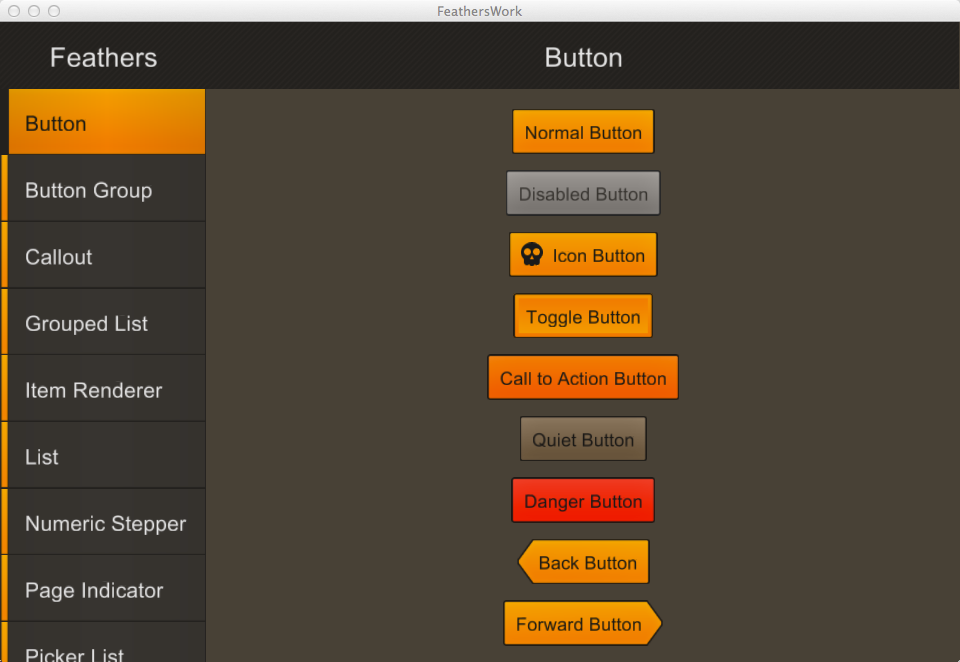
This is a Loom port of the Feathers Component Explorer, demonstrating a variety of different Feathers components and layouts.
Try It
Use the following Loom CLI commands to run this example:
loom new MyFeathersComponentExplorer --example FeathersComponentExplorer
cd MyFeathersComponentExplorer
loom run
Screenshot
Code
src/FeathersComponentExplorer.ls
package
{
    import loom.Application;

    import feathers.events.FeathersEventType;
    import feathers.motion.transitions.ScreenSlidingStackTransitionManager;
    import feathers.system.DeviceCapabilities;
    import feathers.themes.MetalWorksMobileTheme;
    import feathers.controls.*;

    import loom2d.Loom2D;
    import loom2d.events.Event;

    import data.*;
    import screens.*;

    public class FeathersComponentExplorer extends Application
    {
        override public function run():void
        {
            stage.addChild( new Main() );
        }
    }

    /*
    Feathers
    Copyright 2012-2013 Joshua Tynjala. All Rights Reserved.

    This program is free software. You can redistribute and/or modify it in
    accordance with the terms of the accompanying license agreement.
    */

    public class Main extends Drawers
    {
        private static const MAIN_MENU:String = "mainMenu";
        private static const BUTTON:String = "button";
        private static const BUTTON_SETTINGS:String = "buttonSettings";
        private static const BUTTON_GROUP:String = "buttonGroup";
        private static const CALLOUT:String = "callout";
        private static const GROUPED_LIST:String = "groupedList";
        private static const GROUPED_LIST_SETTINGS:String = "groupedListSettings";
        private static const ITEM_RENDERER:String = "itemRenderer";
        private static const ITEM_RENDERER_SETTINGS:String = "itemRendererSettings";
        private static const LIST:String = "list";
        private static const LIST_SETTINGS:String = "listSettings";
        private static const NUMERIC_STEPPER:String = "numericStepper";
        private static const NUMERIC_STEPPER_SETTINGS:String = "numericStepperSettings";
        private static const PAGE_INDICATOR:String = "pageIndicator";
        private static const PICKER_LIST:String = "pickerList";
        private static const PROGRESS_BAR:String = "progressBar";
        private static const SLIDER:String = "slider";
        private static const SLIDER_SETTINGS:String = "sliderSettings";
        private static const TAB_BAR:String = "tabBar";
        private static const TEXT_INPUT:String = "textInput";
        private static const TEXT_INPUT_SETTINGS:String = "textInputSettings";
        private static const TOGGLES:String = "toggles";

        private static const MAIN_MENU_EVENTS:Dictionary.<String, String> =
        {
            "showButton": BUTTON,
            "showButtonGroup": BUTTON_GROUP,
            "showCallout": CALLOUT,
            "showGroupedList": GROUPED_LIST,
            "showItemRenderer": ITEM_RENDERER,
            "showList": LIST,
            "showNumericStepper": NUMERIC_STEPPER,
            "showPageIndicator": PAGE_INDICATOR,
            "showPickerList": PICKER_LIST,
            "showProgressBar": PROGRESS_BAR,
            "showSlider": SLIDER,
            "showTabBar": TAB_BAR,
            "showTextInput": TEXT_INPUT,
            "showToggles": TOGGLES
        };

        public function Main()
        {
            super();
            this.addEventListener(FeathersEventType.INITIALIZE, initializeHandler);
        }

        private var _navigator:ScreenNavigator;
        private var _menu:MainMenuScreen;
        private var _transitionManager:ScreenSlidingStackTransitionManager;

        private function initializeHandler(event:Event):void
        {
            EmbeddedAssets.initialize();

            new MetalWorksMobileTheme();

            this._navigator = new ScreenNavigator();
            this.content = this._navigator;

            this._navigator.addScreen(BUTTON, new ScreenNavigatorItem(ButtonScreen,
            {
                complete: MAIN_MENU,
                showSettings: BUTTON_SETTINGS
            }));

            this._navigator.addScreen(BUTTON_GROUP, new ScreenNavigatorItem(ButtonGroupScreen,
            {
                complete: MAIN_MENU
            }));

            this._navigator.addScreen(CALLOUT, new ScreenNavigatorItem(CalloutScreen,
            {
                complete: MAIN_MENU
            }));

            const sliderSettings:SliderSettings = new SliderSettings();
            this._navigator.addScreen(SLIDER, new ScreenNavigatorItem(SliderScreen,
            {
                complete: MAIN_MENU,
                showSettings: SLIDER_SETTINGS
            },
            {
                settings: sliderSettings
            }));

            this._navigator.addScreen(SLIDER_SETTINGS, new ScreenNavigatorItem(SliderSettingsScreen,
            {
                complete: SLIDER
            },
            {
                settings: sliderSettings
            }));

            this._navigator.addScreen(TOGGLES, new ScreenNavigatorItem(ToggleScreen,
            {
                complete: MAIN_MENU
            }));

            const groupedListSettings:GroupedListSettings = new GroupedListSettings();
            this._navigator.addScreen(GROUPED_LIST, new ScreenNavigatorItem(GroupedListScreen,
            {
                complete: MAIN_MENU,
                showSettings: GROUPED_LIST_SETTINGS
            },
            {
                settings: groupedListSettings
            }));

            this._navigator.addScreen(GROUPED_LIST_SETTINGS, new ScreenNavigatorItem(GroupedListSettingsScreen,
            {
                complete: GROUPED_LIST
            },
            {
                settings: groupedListSettings
            }));

            const itemRendererSettings:ItemRendererSettings = new ItemRendererSettings();
            this._navigator.addScreen(ITEM_RENDERER, new ScreenNavigatorItem(ItemRendererScreen,
            {
                complete: MAIN_MENU,
                showSettings: ITEM_RENDERER_SETTINGS
            },
            {
                settings: itemRendererSettings
            }));

            this._navigator.addScreen(ITEM_RENDERER_SETTINGS, new ScreenNavigatorItem(ItemRendererSettingsScreen,
            {
                complete: ITEM_RENDERER
            },
            {
                settings: itemRendererSettings
            }));

            const listSettings:ListSettings = new ListSettings();
            this._navigator.addScreen(LIST, new ScreenNavigatorItem(ListScreen,
            {
                complete: MAIN_MENU,
                showSettings: LIST_SETTINGS
            },
            {
                settings: listSettings
            }));

            this._navigator.addScreen(LIST_SETTINGS, new ScreenNavigatorItem(ListSettingsScreen,
            {
                complete: LIST
            },
            {
                settings: listSettings
            }));

            const numericStepperSettings:NumericStepperSettings = new NumericStepperSettings();
            this._navigator.addScreen(NUMERIC_STEPPER, new ScreenNavigatorItem(NumericStepperScreen,
            {
                complete: MAIN_MENU,
                showSettings: NUMERIC_STEPPER_SETTINGS
            },
            {
                settings: numericStepperSettings
            }));

            this._navigator.addScreen(NUMERIC_STEPPER_SETTINGS, new ScreenNavigatorItem(NumericStepperSettingsScreen,
            {
                complete: NUMERIC_STEPPER
            },
            {
                settings: numericStepperSettings
            }));

            this._navigator.addScreen(PAGE_INDICATOR, new ScreenNavigatorItem(PageIndicatorScreen,
            {
                complete: MAIN_MENU
            }));

            this._navigator.addScreen(PICKER_LIST, new ScreenNavigatorItem(PickerListScreen,
            {
                complete: MAIN_MENU
            }));

            this._navigator.addScreen(TAB_BAR, new ScreenNavigatorItem(TabBarScreen,
            {
                complete: MAIN_MENU
            }));

            const textInputSettings:TextInputSettings = new TextInputSettings();
            this._navigator.addScreen(TEXT_INPUT, new ScreenNavigatorItem(TextInputScreen,
            {
                complete: MAIN_MENU,
                showSettings: TEXT_INPUT_SETTINGS
            },
            {
                settings: textInputSettings
            }));
            this._navigator.addScreen(TEXT_INPUT_SETTINGS, new ScreenNavigatorItem(TextInputSettingsScreen,
            {
                complete: TEXT_INPUT
            },
            {
                settings: textInputSettings
            }));

            this._navigator.addScreen(PROGRESS_BAR, new ScreenNavigatorItem(ProgressBarScreen,
            {
                complete: MAIN_MENU
            }));

            this._transitionManager = new ScreenSlidingStackTransitionManager(this._navigator);
            this._transitionManager.duration = 0.4;

            if(DeviceCapabilities.isTablet())
            {
                //we don't want the screens bleeding outside the navigator's
                //bounds when a transition is active, so clip it.
                this._navigator.clipContent = true;
                this._menu = new MainMenuScreen();
                for(var eventType:String in MAIN_MENU_EVENTS)
                {
                    this._menu.addEventListener(eventType, mainMenuEventHandler);
                }
                this._menu.height = 200;
                this.leftDrawer = this._menu;
                this.leftDrawerDockMode = Drawers.DOCK_MODE_BOTH;
            }
            else
            {
                this._navigator.addScreen(MAIN_MENU, new ScreenNavigatorItem(MainMenuScreen, MAIN_MENU_EVENTS));
                this._navigator.showScreen(MAIN_MENU);
            }
        }

        private function mainMenuEventHandler(event:Event):void
        {
            const screenName:String = MAIN_MENU_EVENTS[event.type];
            //because we're controlling the navigation externally, it doesn't
            //make sense to transition or keep a history
            this._transitionManager.clearStack();
            this._transitionManager.skipNextTransition = true;
            this._navigator.showScreen(screenName);
        }
    }
}